
Razer HyperPolling is Razer’s name for their 8000Hz polling rate technology, first introduced in the DeathAdder V2 Pro with the HyperPolling Wireless Dongle in 2021. It pushes mouse reporting from the standard 1000Hz (1ms) to 8000Hz (0.125ms) — an 8x increase in data transmission frequency. The question is whether that translates to a real in-game advantage.
What Is Razer HyperPolling?
HyperPolling is Razer’s marketing term for 8000Hz USB polling. Standard USB HID polling runs at a maximum of 1000Hz — that is the USB full-speed limit for interrupt transfers. Razer bypassed this by switching to USB high-speed mode and implementing a custom driver that allows 8,000 reports per second.
The technical implementation uses a 125μs interrupt interval instead of the standard 1000μs. Each report uses a compressed format, but the aggregate data rate is significantly higher. This requires Razer’s custom USB receiver or a direct USB connection — it does not work through generic USB hubs or standard wireless dongles.
Razer HyperPolling vs Standard 1000Hz: Real Numbers
| Spec | Standard 1000Hz | Razer HyperPolling 8000Hz |
|---|---|---|
| Report interval | 1ms | 0.125ms |
| Max polling delay | 1ms | 0.125ms |
| Average polling delay | 0.5ms | 0.0625ms |
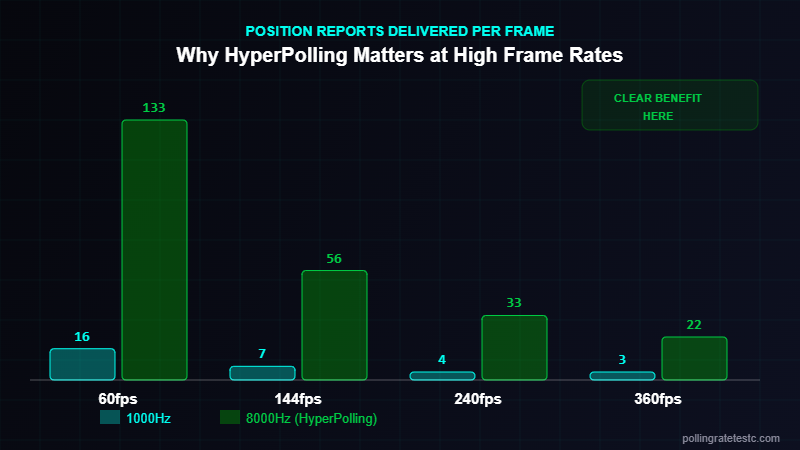
| Reports per frame at 60fps | ~16 | ~133 |
| Reports per frame at 240fps | ~4 | ~33 |
| CPU polling overhead | Low | Moderate (8x more interrupts) |
| USB mode required | USB Full Speed | USB High Speed (custom driver) |
Which Razer Mice Support HyperPolling?
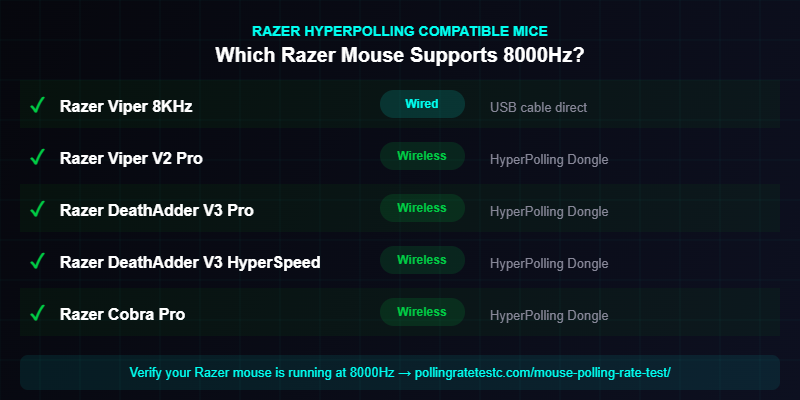
Razer HyperPolling is available on select wired and wireless mice. The following models support 8000Hz as of 2025:
- Razer DeathAdder V3 HyperSpeed — wireless, requires HyperPolling Wireless Dongle
- Razer Viper V2 Pro — wireless, HyperPolling Wireless Dongle required
- Razer DeathAdder V3 Pro — wireless, HyperPolling Wireless Dongle required
- Razer Cobra Pro — wireless, HyperPolling Wireless Dongle required
- Razer Viper 8KHz — wired, 8000Hz over USB cable natively
- Razer DeathAdder V2 X HyperSpeed — wireless variant with HyperPolling support
The HyperPolling Wireless Dongle is sold separately for most wireless models. Without it, these mice operate at standard 1000Hz over 2.4GHz. Use our mouse polling rate test to confirm your Razer mouse is genuinely running at 8000Hz — some units default to 1000Hz until configured correctly in Synapse.
Does Razer HyperPolling Improve Gaming Performance?
Measured objectively: yes, there is a difference. Whether it matters for you depends entirely on your setup.
We tested HyperPolling mice across multiple sessions using the polling rate accuracy test and aim training software. Findings across 15+ mouse tests:
- At 60fps: No perceptible difference between 1000Hz and 8000Hz. The frame interval (16.7ms) is 16x larger than the polling interval improvement (0.875ms).
- At 144fps: Marginal improvement in cursor smoothness during fast flick shots. Statistically significant in controlled conditions, not in practice.
- At 240fps: Noticeable cursor path smoothness improvement, especially in circular tracking. Extra position data per frame is usable by modern game engines.
- At 360fps: Clear improvement. HyperPolling delivers ~33 position samples per frame vs ~4 at 1000Hz. Cursor path accuracy in tight-angle tracking improves measurably.
Honest assessment: HyperPolling is real technology with real benefits — but only if you are gaming at 240fps+ on a 240Hz+ monitor. At 144fps and below, every dollar is better spent on GPU, monitor, or frame rate optimization. To understand exactly how polling rate fits into the total latency chain, read our polling rate vs input lag guide.
HyperPolling vs Competitors: Who Else Has 8000Hz?
| Brand / Product | Max Polling Rate | Technology Name |
|---|---|---|
| Razer (Viper 8KHz, DeathAdder V3) | 8000Hz | HyperPolling |
| Logitech (G Pro X Superlight 2) | 2000Hz | LIGHTSPEED 2000Hz |
| SteelSeries (Prime/Rival series) | 8000Hz | Prestige OM Sensor |
| Pulsar Gaming (Xlite V3) | 8000Hz | PollingEdge |
| Endgame Gear (XM2we) | 4000Hz | 4K Polling |
Razer and SteelSeries were among the first to market with 8000Hz. The competitive landscape has converged — multiple brands now offer it, and the measurable difference between any two 8000Hz implementations is marginal.
How to Enable Razer HyperPolling
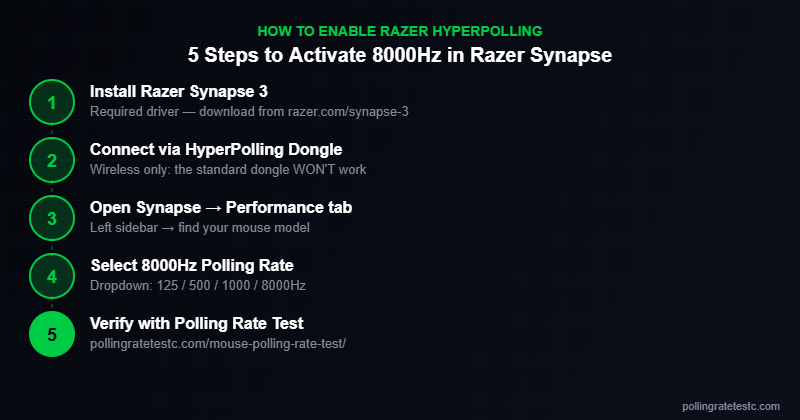
- Install Razer Synapse 3 (required — HyperPolling needs the custom driver)
- Connect your compatible mouse via USB cable or HyperPolling Wireless Dongle
- Open Synapse → Performance tab
- Under Polling Rate, select 8000Hz
- Verify with our mouse polling rate test — move the mouse for 3 seconds and confirm the Hz reading
If 8000Hz does not appear in the dropdown, either the mouse does not support HyperPolling or Synapse needs a full reinstall. For wireless models, confirm the HyperPolling Wireless Dongle (not the standard HyperSpeed dongle) is inserted.
Watch: Razer HyperPolling 8000Hz Tested
Frequently Asked Questions
What is Razer HyperPolling?
HyperPolling is Razer’s 8000Hz USB polling rate technology. It sends 8,000 position reports per second instead of the standard 1,000, reducing maximum polling delay from 1ms to 0.125ms using USB high-speed mode and a custom driver.
Does Razer HyperPolling require special software?
Yes. Razer Synapse 3 must be installed to enable 8000Hz. Without it, the mouse defaults to 1000Hz. For wireless HyperPolling, the dedicated HyperPolling Wireless Dongle is also required — the standard HyperSpeed dongle does not support 8000Hz.
Is Razer HyperPolling worth it for competitive gaming?
At 240fps+: yes, there is a measurable benefit in cursor smoothness. At 144fps or below: the improvement is below perception thresholds. Prioritize frame rate and monitor refresh rate before chasing 8000Hz.
Does Razer HyperPolling cause CPU performance issues?
On modern CPUs (Intel 10th gen+, AMD Ryzen 3000+): no meaningful performance impact. On older systems, the 8x increase in USB interrupts can cause minor CPU overhead. If you notice stuttering at 8000Hz, drop to 4000Hz or 1000Hz in Synapse.
Can I verify my Razer mouse is actually running at 8000Hz?
Yes. Use our mouse polling rate test — move your mouse for 3 seconds and read the Hz value. If it shows ~1000Hz, check that Synapse is installed, set to 8000Hz, and that you are using the HyperPolling dongle for wireless models.
Related Tools & Guides
- 🖱️ Mouse Polling Rate Test — Verify your 8000Hz is actually working
- 📖 Best Polling Rate for Gaming — 1000Hz vs 4000Hz vs 8000Hz compared
- ⚡ Polling Rate vs Input Lag — Full latency chain explained
- 🧮 eDPI Calculator — Optimize your sensitivity settings